
Let's be real—spending days buried in spreadsheets is a slow, painful way to find keywords. It’s a repetitive grind, and it pretty much guarantees you'll miss out on golden opportunities hiding in plain sight.
If you want to actually scale your SEO, you have to automate keyword research. It’s how you turn a manual chore into a serious strategic advantage.
Why Manual Keyword Research Just Doesn't Cut It Anymore

If you've ever burned an entire Monday exporting CSVs and sorting through thousands of rows, you know the pain. Doing keyword research by hand is a classic SEO task, but let's face it—it's become a massive bottleneck that slows down content creation and kills growth.
The sheer volume of data is just too much for one person to handle well. Sure, you might find a few good keywords, but you’re leaving hundreds of valuable, low-competition terms on the table. This old-school method isn't just inefficient; it's a competitive disadvantage.
The Endless Time Sink
Pulling data from multiple tools, cleaning up spreadsheets, and trying to spot patterns is a surefire recipe for burnout. It’s a low-value, repetitive task that eats up hours you could be spending on high-level strategy, improving content quality, or building links.
Think about the last time you did keyword research from scratch. How many hours did it take just to get a usable list? Now, imagine getting a prioritized list of opportunities in a matter of minutes. That's the core promise when you automate keyword research.
You're Missing Out on Trends and Opportunities
Trends can pop up and disappear in just a few weeks. By the time you manually identify a new, trending topic, your competitors might have already locked down the top spots. Automation lets you set up systems that are always scanning for what's new, giving you a massive head start.
This isn't just about being faster; it's about staying relevant. Manual methods often keep you stuck looking at what’s popular now, not what’s about to blow up.
The real problem with manual research is human limitation. We just can't process data at the scale or speed needed to compete today. Automation blows the ceiling off, letting strategy—not data entry—drive your results.
This shift isn't just a theory; it's backed by what's happening in the industry. In fact, 75% of marketers are now using AI to slash time on manual tasks like this, and a whopping 65% of businesses are reporting better SEO outcomes thanks to AI.
The fundamentals of finding good keywords are still crucial, but the way we find them has completely changed. If you need a refresher on the basics, you can check out our guide on how to do keyword research. The principles haven't changed, but your execution needs an upgrade.
Building Your Automated Keyword Research Stack

Jumping into automation can feel like walking into a massive hardware store. You see endless aisles of shiny tools, and it’s tempting to grab everything. But just collecting a bunch of software subscriptions isn’t the answer.
What you really need is a synergistic "stack"—a set of tools that work together, each with a specific job. The goal isn’t to have the most tools; it’s to have the right ones talking to each other.
A smart stack should be built around three core jobs: digging up new ideas, spying on your competition, and using AI to find the real gold. This approach ensures you cover all your bases, from brainstorming broad topics to finding those super-specific, high-intent keywords your competitors completely missed.
The Three Pillars of Your Stack
A truly effective automated research stack isn't about finding one magical, all-in-one platform. It's about combining specialized tools to build a workflow that fits how you actually work.
Here’s a breakdown of the key pieces you’ll need:
Idea & Trend Generators: These are your scouts. Their job is to constantly scan places like Google Trends, Reddit, and Quora for emerging topics and broad "seed" keywords before everyone else jumps on them. Think of it as your 24/7 trend-spotting machine.
Competitive Gap Analyzers: This is where the real opportunities lie. These tools automatically watch what your competitors are doing and find the keywords they rank for that you don't. It's a direct pipeline to proven, valuable keyword ideas without any manual digging.
AI-Powered Clustering & Filtering: This is the brain of the whole operation. A platform like RankHub takes the huge, messy lists from your other tools and does the heavy lifting. It filters out the junk, groups keywords by search intent, and prioritizes what to tackle next based on what matters to your business. This AI layer turns raw data into a clear content roadmap.
Think of it like building an assembly line. The first tool finds the raw materials (ideas). The second shows you what the competition is building. And the third tool refines and prepares those materials for your content team to use.
Choosing the Right Tools for the Job
To help you piece together your stack, it's useful to think about tools in terms of their primary function. Do you need a discovery engine, a competitive intelligence platform, or a robust data analysis tool?
Comparing Keyword Research Tool Categories
This table breaks down the main categories to help you decide where to focus your resources based on your primary SEO goals.
| Tool Category | Primary Function | Best For | Example Tools |
|---|---|---|---|
| All-in-One SEO Platforms | Broad keyword research, rank tracking, and competitor analysis. | Teams needing a single solution for multiple SEO tasks. | Ahrefs, Semrush, Moz |
| Topic & Idea Generators | Finding emerging trends and content ideas from real-world sources. | Content marketers looking for fresh, relevant topics to cover. | AlsoAsked, AnswerThePublic |
| Competitive Intelligence | Deep analysis of competitor rankings and content strategies. | SEOs focused on finding and exploiting gaps in the market. | SpyFu, Similarweb |
| AI-Driven Clustering & Prioritization | Organizing massive keyword lists by intent and business value. | Agencies and in-house teams managing large-scale content strategies. | RankHub, Keyword Cupid |
Ultimately, the best stack isn't just a collection of popular tools. It's a thoughtful combination that automates the most time-consuming parts of your workflow, giving you back the time to focus on strategy and creating great content.
Tailoring the Stack to Your Business Model
The perfect automation stack is never one-size-fits-all. A local plumber and a global e-commerce brand have completely different needs, and their tools should reflect that.
For a local service business, the stack should be all about finding geo-specific keywords and analyzing local search results. They need automation tuned to capture intent-driven terms like "emergency plumber in Brooklyn" or "best HVAC repair near me."
On the other hand, a global e-commerce store needs a stack built for massive scale. They need tools that can handle hundreds of thousands of product keywords, analyze international competitors, and pinpoint transactional long-tail phrases across different countries.
As you think about your workflow, it can be helpful to see how other industries handle automation; you can explore various social media automation tools to see how they approach similar challenges of scheduling and analysis. The right mix of tools will make all the difference in how well you can automate keyword research and turn that data into real revenue.
Designing Your First Automated Workflow
Alright, let's get our hands dirty and move from theory to actually building something. Creating an automated workflow doesn't mean you need to be a coding wizard or juggle a dozen different subscriptions. It's really about setting up a smart, logical process that feeds you great keywords on autopilot.
Let’s walk through a real-world scenario to see how this plays out.
Imagine you're heading up content for a new B2B SaaS product—a project management tool built specifically for remote teams. Your mission is to automate keyword research so you're constantly uncovering valuable search terms, but without getting lost in spreadsheet hell for hours on end.
First things first, you need to define your "seed" topics. Think of these as the big, foundational pillars your product stands on. For our SaaS tool, these might look something like this:
- Project management software
- Team collaboration tools
- Remote work productivity
- Task management apps
These seeds are the fuel for your automation engine. Instead of manually brainstorming every possible variation, you’ll just feed these core ideas into your tool and let it run.
Setting Up the Automation Engine
With your seed topics locked in, it’s time to configure your automation tool. The goal here is to build a workflow that doesn’t just find more keywords, but also enriches them with the data that actually matters, like search intent and how hard it'll be to rank.
You'd kick things off by telling the tool to find all the related long-tail keywords. This first step alone can explode four simple seed topics into a list of 10,000+ potential keywords. Trying to sort through that manually would take days. An automated system knocks it out in minutes.
But the real magic happens in the next few layers of automation. You'll set up your workflow to automatically handle the tedious stuff:
- Group by Intent: The system dives into the SERPs for each keyword and neatly sorts them. It figures out if people are looking for information ("what is agile project management"), comparison shopping ("best project management software for small business"), or something else entirely.
- Filter for Relevancy: It automatically weeds out the junk. Think terms related to job searches ("project manager jobs") or "free" tools if you're a premium product. This keeps your list clean and focused.
- Analyze Difficulty: The workflow instantly gauges the ranking difficulty for every keyword. This gives you a clear roadmap of quick wins versus long-term battles.
This process basically transforms a firehose of raw data into organized, actionable insights.
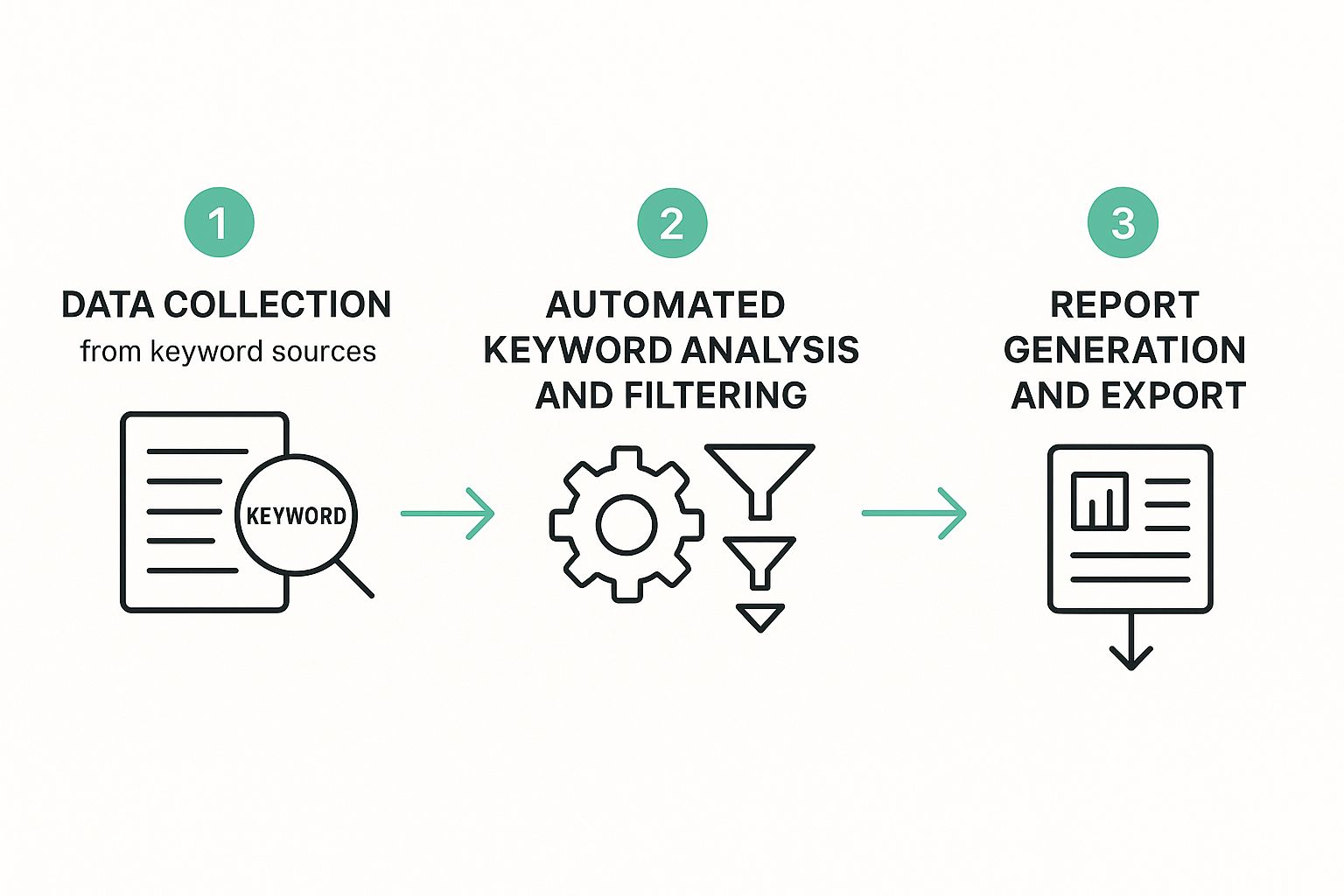
As you can see, it's a clean, three-part flow. You go from raw data to ready-to-use keyword groups without all the mind-numbing manual filtering.
Creating Continuous Opportunity Streams
A one-time data pull is nice, but true automation is about creating a continuous flow of fresh opportunities. The final piece of the puzzle is setting up ongoing monitoring and alerts. This is what turns your keyword research from a one-off project into a self-sustaining system.
You can create simple rules that ping you when something important happens. For instance, get a notification when:
- A new keyword related to your seed topics starts gaining traction.
- A competitor suddenly starts ranking for a high-value term you’re not targeting.
- The search intent for one of your target keywords begins to shift.
For example, your workflow could send you a weekly digest of all new "X vs Y" comparison keywords in the "team collaboration tools" space with a difficulty score under 30. That's a list of ready-to-go content ideas dropped right into your inbox, no extra work needed.
When you design a workflow like this, you're not just automating a task; you're building an intelligence engine. It's constantly scanning the horizon for opportunities and threats, giving you a serious leg up on the competition.
And while the focus here is on automation, having a solid grasp of platform-specific nuances, like Pinterest keyword research strategies, can really help you fine-tune your workflows. That kind of foundational knowledge lets you set smarter rules and filters, making sure your automated system is pulling in the most relevant data, no matter the channel.
Using AI to Supercharge Your Strategy

Automation is great for pulling in the raw data, but AI is what actually makes sense of it all. I like to think of it this way: automation builds the library of keywords, but AI is the expert librarian who points you to the exact books you need to read and explains why. This is where your process evolves from just gathering keywords to generating real, actionable intelligence.
AI-powered tools go way beyond basic metrics like search volume. They dig deep, analyzing the SERPs at scale to figure out the true search intent behind a query. Is someone trying to buy, learn, or compare? Getting this right is often the difference between content that actually drives business and content that just… sits there.
This kind of analysis is a massive leap forward. Instead of just guessing which keywords are most likely to bring in customers, AI models can predict conversion potential with some pretty impressive accuracy. They do this by spotting subtle patterns in language and in the types of content already ranking for those high-value terms.
Going Beyond Basic Data Collection
The real magic of adding AI to your keyword research is its ability to see the entire forest, not just the trees. It connects dots a human could never spot manually, identifying content gaps your competitors are winning with or flagging emerging trends before they even hit the mainstream.
For example, an AI tool might pick up on a sudden surge in searches like "AI project management integration" weeks before it registers on Google Trends. That gives you a huge head start. You can be creating content and capturing traffic while your competitors are still trying to figure out what's happening. This proactive approach is a core benefit when you automate keyword research with AI.
AI doesn't just make your research faster; it makes your entire content strategy smarter. It flips the script from a reactive game of chasing keywords to a predictive one where you're anticipating what your audience needs next.
And this isn't just some niche trend. The AI market is expected to balloon to $190 billion by 2025, and a massive chunk of that is driven by its use in digital marketing. AI is already the engine behind advanced competitor gap analysis, long-tail keyword discovery, and automated trend-spotting, helping marketers find those hidden gems that manual methods would completely miss.
From Keywords to Actionable Content Briefs
One of the most practical ways AI helps is by turning all that data into a clear plan of action. Modern platforms don’t just dump a list of keywords on you; they generate detailed, data-backed content briefs.
These AI-generated briefs usually include things like:
- Key subtopics you absolutely have to cover to satisfy search intent.
- Common questions people are actually asking online that your content needs to answer.
- Word count targets based on what's already ranking at the top.
- Internal linking suggestions to help build up your site's topical authority.
This completely bridges the gap between the research phase and the creation phase, making sure every single article you publish is strategically built to rank. If you want to go deeper, our guide on how to use AI for SEO has more practical tips. Tying these two processes together makes your whole content pipeline more efficient and a heck of a lot more effective.
Turning Automated Insights Into Action
So your new automated system just dropped a mountain of keywords on your desk. Fantastic. But let's be real—raw data is just noise until you give it a job. The real work begins now, turning that massive list into a content plan that actually moves the needle for your business.
This is where strategy takes over from data collection.
First things first: you have to filter, and you have to be ruthless about it. Chasing vanity metrics like huge search volumes is a classic rookie mistake that leads straight to burnout. Not every keyword is a good keyword for you.
The key is to tie every single term back to a clear business goal. Are you trying to get on the radar of people who don't know you exist (top-of-funnel)? Or are you trying to scoop up leads who have their credit cards out, ready to buy (bottom-of-funnel)?
Creating a Keyword Priority Matrix
To slice through the noise, I always recommend building a simple ‘Keyword Priority Matrix’. Don't let the name scare you; it’s not some ridiculously complex spreadsheet. It’s just a way of thinking that helps you sort and prioritize. You'll want to grade each keyword or cluster on three main things:
- Business Relevance: How directly does this keyword connect to what you sell? For a project management SaaS, a term like "free project management templates" is gold. A broad term like "productivity tips"? Not so much.
- Search Volume: Is anyone actually looking for this? While you need some demand, don't get obsessed. A keyword with 100 monthly searches that converts like crazy is way better than one with 10,000 that brings in zero customers.
- Ranking Difficulty: Let's get real for a second. Can you actually rank for this keyword right now? Be honest about your website's authority. Going after low-difficulty keywords first is a smart play to build momentum and get some quick wins.
Running your automated keyword lists through this filter helps the high-value targets jump right out at you. This strategic sorting is what separates campaigns that succeed from those that just spin their wheels. For a deeper dive on this, check out our guide on keyword research best practices.
The goal isn't to find the most keywords; it's to find the right keywords. A tight, highly relevant list of 50 terms is infinitely more valuable than a generic list of 5,000.
From a List to a Content Calendar
Once you’ve got your prioritized list, it's time to map it all out on a content calendar. This is the final piece of the puzzle.
Start grouping related keywords into logical clusters. Each cluster can then become a single, powerhouse piece of content. This is the classic pillar-and-cluster model, and it works wonders for building topical authority in your niche.
For example, a cluster of keywords around "remote team collaboration" could become a whole series. You might plan a massive pillar page like "The Ultimate Guide to Remote Work," supported by smaller articles on topics like "best tools for remote teams" or "how to run an effective virtual meeting."
This is how you ensure all your efforts to automate keyword research translate directly into a smart, cohesive content strategy that actually delivers results.
Jumping into automation always kicks up a few questions. It's a new way of working, after all. Let's tackle some of the common concerns I hear so you can get started with confidence. Honestly, it's not as complex as it sounds.
A lot of people's first worry is about their job security.
Will Automation Make My SEO Job Obsolete?
Not a chance. Think of automation as a ridiculously powerful assistant, not a replacement. It’s here to augment your skills, not make them redundant. It handles the mind-numbing, repetitive parts of the job—the data crunching and sorting—so you can focus on what humans do best: strategic thinking.
I like to put it this way: automation hands you the map, but a seasoned SEO still has to chart the course. You're the one who interprets the data, deciphers the subtle shifts in user intent, and makes the creative calls that actually move the needle.
Automation tells you what the keywords are. The SEO specialist figures out the why (the strategy) and the how (the execution). It elevates your role from a data-puller to a true strategist.
What’s This Going to Cost Me?
This is a classic "it depends" scenario, but you really can choose your own adventure here. The cost comes down to the tools you decide to stack together.
You can go with an all-in-one SEO platform like Ahrefs or Semrush, which often bundle automation features into their monthly plans. These can range anywhere from $100 to over $400 a month.
Or, you could piece together a more custom setup using specialized AI tools or APIs. The great thing about this approach is that you can start small with one affordable tool and add more to your stack as your budget—and your needs—grow.
How Often Should I Run These Automated Workflows?
The right cadence really depends on your industry and what you're trying to achieve. There’s no magic number, but here are a few rules of thumb I've found work well:
- For fast-paced industries: If you're in a trend-driven niche like tech, crypto, or fashion, you’ll want to run your workflows weekly, or even set up daily alerts. This is how you catch those emerging keywords right as they start to pop.
- For keeping tabs on competitors: A weekly check-in is the sweet spot. It’s frequent enough to catch any big moves they’re making without drowning you in noise.
- For your big-picture strategy: When it comes to broad topic discovery and refreshing your content plan, running a deep-dive analysis once a quarter is perfect. This gives you a chance to zoom out, spot new content pillars, and plan for long-term growth.
Ready to stop guessing and start getting clear, actionable keyword opportunities delivered to you? RankHub reads your entire site in under 60 seconds and builds a tailored SEO strategy automatically. Try RankHub's Auto Research now.
More from Our Blog
7 Content Writing Tools That Boost Your SEO Rankings
Discover the top 9 SEO content writing tools to automate drafting, optimization, and publishing. Boost rankings with AI-assisted workflows.
Read more →
Zoho Marketing Automation Explained: Is It Right for You?
Compare Zoho Marketing Automation vs HubSpot on pricing, features, ease of use, and automation depth. See which wins for small teams and solo founders.
Read more →
Looking for an SEO Company? Here Are Your Best Options
Compare top SEO companies, AI platforms, and agencies. Find the best fit for your budget, from $49/month tools to full-service retainers.
Read more →