Let's be real: writing meta descriptions is all about crafting a tiny, powerful pitch that shows up right under your page title in the search results.
What Are Meta Descriptions and Why Should You Care?
Think of a meta description as your 160-character sales pitch on a jam-packed search results page. It's that little chunk of text right below your title, and its one job is to get someone to click your link instead of the ten others staring back at them. While it's not a direct ranking factor anymore, it has a massive impact on your click-through rate (CTR).
This small snippet is often your first—and maybe only—chance to make an impression. It sets the stage for what a user can expect, shaping their idea of your brand before they even hit your website.
The Real Impact on Your Traffic
A killer meta description is like a digital welcome mat. It shouts, "Hey, you! This page has exactly what you're looking for." It’s the bridge between what someone typed into Google and the solution your content provides. A higher CTR is a strong signal to Google that your page is a good match for that search, which can absolutely help your SEO in the long run.
The purpose of a meta description is simple: it needs to get someone searching on Google to click your link. In other words, meta descriptions exist to generate click-throughs from search engines.
Leaving them blank is like leaving the front window of your shop empty. It’s a huge missed opportunity. In fact, some studies show that around 25% of top search results still don't have meta descriptions, which is just hamstringing their own traffic potential. You can get a leg up on the competition just by doing this one simple thing right. For more tips on this, check out these meta tag best practices from WomenConquerBiz.com.
What Happens When Google Rewrites Them
So, you've written the perfect meta description, but then you notice Google is showing something completely different. Don't panic! This isn't a penalty. It's just Google trying to pull what it thinks is the most relevant snippet from your page to answer a very specific search query.
Here’s a great example of a meta description doing its job in the wild.

See how the keyword "site structure" is bolded? That instantly grabs your attention and confirms the page is relevant. While you can't force Google to use your description 100% of the time, writing a clear, compelling, and unique one for every important page gives you the best shot at having it show up just the way you want.
To nail this every time, it helps to keep some core principles in mind.
Meta Description Do's and Don'ts Quick Guide
| Do | Don't |
|---|---|
| Include your target keyword naturally. | Keyword stuff. It reads terribly and doesn't work. |
| Write in an active, compelling voice. | Be passive or boring. You're trying to earn a click! |
| Focus on user benefits and what's in it for them. | Just list features. People care about solutions. |
| Keep it under 160 characters. | Write a novel. It will just get cut off. |
| End with a clear call-to-action (CTA). | Leave the reader hanging. Tell them what to do next. |
Following these simple rules is the fastest way to turn your meta descriptions from an afterthought into a powerful tool for driving traffic.
Writing Meta Descriptions That Actually Work
Think of your meta description as a tiny, powerful billboard on the search results page. You get one shot to convince someone that your link is the one they need to click. It’s less about following a rigid formula and more about genuinely connecting with the person searching.
This all starts with understanding what they’re actually looking for. Before you even think about writing, put yourself in their shoes. What problem are they trying to solve? Are they hunting for information, ready to buy a product, or looking for a specific service? The answer to that question will shape every word you write. At the end of the day, this is all about applying solid copywriting principles for businesses to get that all-important click.
Nail Your Keyword and Voice
Once you have a handle on the searcher's goal, fitting your primary keyword in feels natural, not forced. The trick is to make it sound like a human wrote it, not a robot just stuffing in keywords. For example, if your target keyword is "best hiking boots for women," you'd want your description to flow smoothly around that phrase.
This is also the perfect place to let your brand's personality show. Are you the serious, trusted expert, or the fun, quirky guide? Let that voice come through. A description that sounds authentic builds a little bit of trust before they even land on your page.
A great meta description answers the searcher’s silent question: "Is this page worth my time?" It needs to clearly promise a solution, spark their curiosity, and give them a peek at the value waiting on the other side.
This isn't just about sounding good; it has a real impact on your performance. The image below breaks down how a solid meta description can directly influence your SEO.
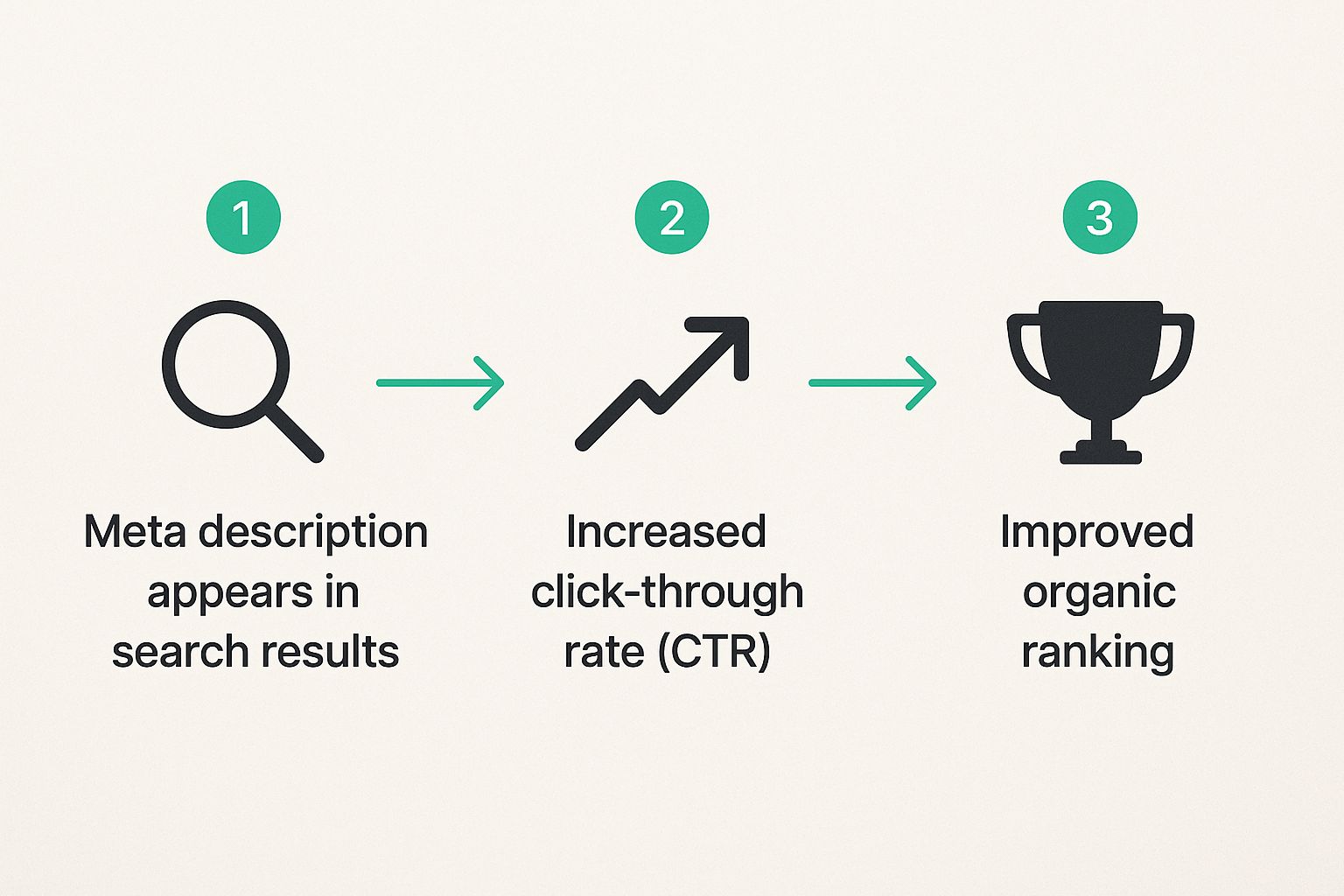
As you can see, there's a clear connection here. A compelling description boosts your click-through rate (CTR). That higher CTR then sends a strong signal to search engines that your page is a great match for the query, which can help improve your rankings over time.
Structure Your Description for Clicks
Knowing what to say is only half the battle. The other half is knowing how to say it, especially when you're working with a tight space—usually around 155 characters.
I've found this simple structure works wonders for packing a punch:
- Promise a Solution: Kick things off by hitting on their problem directly. Acknowledge their pain point and show them you have the fix.
- Add a Compelling Detail: Drop in a specific benefit, a surprising statistic, or a unique feature that sets your content apart. This is what makes people curious.
- Include a Call-to-Action (CTA): Give them a gentle nudge. Simple phrases like "Learn how," "Find your match," or "Get the details" work incredibly well.
This isn’t a rigid rule, but a framework that helps turn a boring summary into an active invitation. It’s about earning the click, not just describing the page. Of course, none of this works if you're targeting the wrong terms to begin with. If you're not confident in your keywords, our guide on https://rankhub.ai/blog/how-to-do-keyword-research is the perfect place to start.
Let’s see this in action. Say you've written a blog post about organizing a small kitchen.
- Bad Example: "This post is about small kitchen organization. We have many tips for organizing a small kitchen, including storage ideas and other things for your kitchen."
Yikes. It's repetitive, passive, and wastes precious character space.
- Good Example: "Tired of kitchen clutter? Discover 15 clever storage hacks to organize even the tiniest kitchen. Get expert tips and find smart solutions today!"
See the difference? This one is active. It addresses a pain point ("kitchen clutter"), offers a specific promise (15 hacks), and wraps up with a clear CTA. It’s concise, compelling, and built to get that click.
Finding the Perfect Length and Format
When you're trying to write a meta description that actually gets clicks, size really does matter. Think of it as the Twitter of SEO—you've got a tiny bit of space to make a huge impression, and every single character counts. Your job is to grab someone's attention and deliver your core message before Google’s dreaded ellipsis "..." cuts you off mid-thought.

This isn’t just some arbitrary number, either. Years of data and analysis show that keeping your meta description in the 150-160 character range is the absolute sweet spot. This length gives you just enough room to be persuasive without getting awkwardly truncated on most desktops and mobile phones. If you want to dive deeper into the data behind these guidelines, this detailed analysis from Search Engine Land is a great read.
On the flip side, a description that’s too short is just a missed opportunity. You're basically leaving prime real estate on the search results page empty—space you could have used to convince someone your page has the answer they're looking for.
Formatting for Maximum Impact
Okay, so you've got the character count down. But how you structure the description is just as important. Simply summarizing the page's content is rarely enough. You need to create some energy and give the user a reason to click on your link instead of the nine others on the page.
A few simple formatting tweaks can turn a boring summary into a powerful little ad for your content:
- Go with an active voice. Instead of something passive like, "Tips for keyword research can be found here," switch it up to: "Discover expert tips for keyword research." It feels more direct and pulls the reader in.
- Put the good stuff first. Your most important message and your primary keyword should be right at the beginning. That way, the core of your message gets seen even if the end gets cut off.
- Sprinkle in numbers or special characters. I've found that snippets with numbers (like "10 Easy Steps") or symbols (like "✓ Free Shipping") really pop. They visually break up the wall of text on a results page and naturally draw the eye.
Nailing this is a fundamental part of the content creation process, right up there with solid keyword research best practices.
Pro Tip: Read your meta description out loud. Seriously. Does it sound like something a real person would say in a conversation? If it sounds stiff or robotic, scrap it and try again. The goal is to connect with a human, not just appease an algorithm.
Real-World Examples of Sizing Gone Wrong
Let's look at a classic mistake I see all the time. Say you’re searching for "DIY coffee table plans."
- Too Long: "Find the best DIY coffee table plans right here. We have collected dozens of amazing, easy-to-follow tutorials for rustic, modern, and industrial designs that you can build this weekend with just a few basic tools and..."
See the problem? The most convincing part of the message gets lost in the void. The searcher never even sees the payoff because Google chopped it off.
- Too Short: "DIY coffee table plans."
This tells the user absolutely nothing. It's a completely wasted chance to explain why your plans are better than the competitor's link sitting right above or below yours.
By sticking to that ideal length and using an active, front-loaded format, you give your content its best shot at standing out and earning that all-important click.
Common Meta Description Mistakes (and How to Sidestep Them)
Writing a great meta description is as much about what you don't do as what you do. We've all seen them in the wild—those search results that just make you cringe. They're either completely lazy, stuffed with keywords, or just plain confusing.
Let's walk through the biggest mistakes I see all the time so you can make sure your descriptions are the ones that actually get clicked.
The "Copy-Paste" Blunder: Duplicate Descriptions
One of the most common slip-ups is simply duplicating descriptions across multiple pages. It’s tempting to write one generic blurb for all your service pages and call it a day, but that sends a signal to search engines that you're cutting corners. Every single page on your website has a unique job to do, and its meta description needs to reflect that.
When Google sees repetitive or irrelevant descriptions, it often just ignores them. Instead, its algorithm will pull a snippet from your page that it thinks is a better fit for the user. Sometimes it gets it right, but do you really want to leave that up to a machine? You can dig into the nitty-gritty of why this happens and how to handle it in Google's official documentation for developers.
The Keyword Stuffing Trap
Ah, keyword stuffing. This is an old-school SEO tactic that died a long, long time ago but still pops up now and then. It's the digital equivalent of a salesperson just yelling a list of features at you—and it's a huge turn-off.
Here’s a classic example of what not to do:
- Before (Keyword Stuffed): "Best hiking boots for women, cheap hiking boots, waterproof hiking boots for sale. Buy our best hiking boots for women today."
This sounds robotic and desperate. It’s written for a search engine from 2005, not for a real person who's looking for quality gear.
Let's fix it:
- After (Fixed): "Searching for the best hiking boots for women? Explore our top-rated waterproof options designed for comfort and durability on any trail. Shop now and find your perfect fit!"
See the difference? The "after" version still targets the core keyword but frames it around the user's needs. It speaks to their problem, offers a solution, and wraps it up with a clear call to action. Much more effective.
Remember, the goal isn't just to get seen—it's to earn the click. Keyword stuffing actively works against you by making you look untrustworthy.
The Misleading Bait and Switch
This one is maybe the most harmful mistake of all: writing a description that promises something your page doesn't deliver. Sure, a flashy promise might get you that initial click, but your bounce rate will go through the roof, and your credibility will tank.
Imagine a user is looking for "free social media templates." They see this in the search results:
- Misleading Description: "Download our completely free social media templates! Get instant access to hundreds of professionally designed layouts for Instagram, Facebook, and more."
They click, excited for their free stuff, only to land on a blog post about using templates that tries to sell them a premium pack. That person is hitting the "back" button so fast it'll make your head spin. That quick exit tells Google your page isn't the right answer for that search, which can hurt your rankings down the road.
Your meta description is a promise. Always make sure it's an honest preview of the value waiting on the other side of the click. Trust begins in the SERPs.
Advanced Tactics to Make Your Snippets Stand Out

So, you've nailed the basics of meta descriptions—you know the right length, and you're placing your keywords smartly. Now it's time to get a real edge.
The search results page is a battlefield for attention. A few clever techniques can make your snippet the one that searchers simply have to click. This is where you stop just describing your page and start selling the click.
Think beyond a simple sentence. One of the most powerful tools in your arsenal is structured data, often called schema markup. It's a bit of code you add to your site that helps search engines understand what your content is really about on a much deeper level.
When Google gets this extra context, it can reward you with a rich snippet. Suddenly, your plain text result can show off eye-catching extras like star ratings for a product, cooking times for a recipe, or even a clickable FAQ section right in the search results. These visual upgrades demand more space and instantly make you look more credible.
Table: Schema Markup for Enhanced Snippets
To give you a clearer picture, here's a look at some common schema types and how they can seriously upgrade your snippet's appeal.
| Schema Type | What It Does | Best For |
|---|---|---|
| Review/Rating | Displays star ratings (e.g., 4.5 out of 5 stars) directly in the search results. | Products, local businesses, recipes, apps, courses. |
| FAQPage | Adds a collapsible list of frequently asked questions and answers below your description. | Service pages, informational articles, product pages with common questions. |
| Recipe | Shows details like cooking time, calories, and a user rating. | Food blogs, recipe sites, restaurant menus. |
| Product | Displays price, availability, and ratings, making your listing look like a mini product page. | E-commerce stores, affiliate product reviews. |
Using the right schema is like giving your meta description a superpower, making it work that much harder for you.
Match Your Writing to Your Content
One size does not fit all. The meta description that works wonders for a product page will completely bomb for an in-depth blog post. Truly effective writing means you have to adapt your style and message to fit what the page is actually offering.
Let's break it down with a few real-world scenarios:
- For E-commerce Products: Be direct and highlight the benefits. Mention key specs, pricing, or a killer selling point like "free shipping." You can create a little urgency with phrases like "Shop now" or "Limited stock available."
- For Blog Posts & Guides: Your job is to spark curiosity. Ask a question that your article answers, or hint at a surprising outcome. You want them to feel like they're missing out on a secret if they don't click to read more.
- For Service Pages: Go straight for the pain point. A plumber's description could start with "Leaky pipe causing chaos?" to instantly connect with someone in a panic.
If you're looking for more ways to hook your audience, you can learn a ton from the strategies for making content interesting that presenters use to keep people glued to their seats.
Use A/B Testing to Find What Really Works
Crafting great copy is a mix of art and science. Best practices are a fantastic starting point, but the only way to know for sure what clicks with your audience is to test it. This is where A/B testing your meta descriptions can be a total game-changer.
You can run simple experiments using tools that track click-through rates (CTR), or even do it yourself by changing the descriptions for a few key pages and keeping a close eye on their performance in Google Search Console for a few weeks. Test different calls-to-action, try a more casual tone, or highlight a different benefit.
By letting data guide your decisions, you turn guesswork into a repeatable strategy. A 1% increase in CTR might not sound like much, but for a high-traffic page, it can mean thousands of extra visitors over time.
This cycle of continuous improvement is what separates the good SEOs from the great ones. A great first step is to see what your competition is up to. Our guide on performing a https://rankhub.ai/blog/competitor-analysis-in-seo shows you exactly how to see what's working for them, giving you a perfect baseline for your own tests.
Your Burning Questions About Meta Descriptions, Answered
Alright, so you've got the basics down. But as soon as you dive in, a bunch of "what if" scenarios probably pop into your head. That's totally normal. Let's tackle some of the most common questions that come up once you start writing meta descriptions in the real world.
Think of this as your quick-reference guide for those tricky situations. We'll get straight to the point on what to expect from Google, how to handle descriptions when you've got thousands of pages, and when it’s actually worth your time to go back and make updates.
Does Google Always Use My Meta Description?
The honest answer? Nope, not always. This is probably the biggest point of confusion for people. You can spend hours crafting the most compelling, click-worthy description, and Google might still decide to show something else.
Why? Because Google's number one job is to give the searcher the most relevant snippet for their specific query. If its algorithm thinks a chunk of text pulled directly from your page does a better job of answering that person's question, it will use that instead.
Here's the bottom line: Writing a unique, relevant, and properly-sized meta description gives you the best possible chance of Google using it. You can't force the issue, but you can definitely stack the deck in your favor.
Should Every Single Page Have a Unique Description?
In a perfect world, yes. For all the pages you really care about ranking—your homepage, your main service pages, top-selling products, and your best blog posts—a custom-written meta description is absolutely essential. Don't skip this for your priority content.
But let's get real. If you’re running an e-commerce store with 20,000 product pages, writing each one by hand is a complete non-starter. In a situation like that, the smart move is to create a dynamic template that pulls in unique details like the product name, brand, or a key spec.
Here's my rule of thumb:
- Write them by hand: For your most valuable, "money-making" pages.
- Use a smart template: For huge sites where manual writing just isn't practical.
Keep in mind, though, that a manually written description will almost always outperform a generated one. That human touch really does make a difference.
How Often Should I Update My Meta Descriptions?
You definitely don't need to be messing with them every week. But treating them as a "set it and forget it" task is a mistake, too. Think of it more like a periodic check-up to keep everything sharp.
I typically recommend updating meta descriptions in a few key scenarios:
- You've just overhauled the content on the page. If the page has changed, the description should, too.
- The page is ranking well but has a terrible click-through rate (CTR). You can see this right in Google Search Console. A new description could be the hook you need.
- You're launching a new sale or special offer and want to advertise it right there in the search results.
Treat your meta descriptions like living parts of your site. A little bit of refinement over time can go a long way in serving both your audience and your bottom line.
Ready to stop guessing and start ranking? RankHub takes the manual labor out of keyword research and content strategy. Get AI-powered insights tailored to your website in under a minute. Find your high-value opportunities at RankHub.
More from Our Blog
Digital Marketing Online: Your Complete Roadmap to Success
Master digital marketing online with our comprehensive guide. Learn strategies, tools, and best practices to grow your business in 2025.
Read more →
Beyond Traditional SEO Services: Better Alternatives for Your Budget
Compare top SEO services platforms: RankHub, Outrank, SEObot & alternatives. Find the best fit for your budget, team size & automation needs.
Read more →
10 Online Business Ideas That Work for Beginners & Entrepreneurs
Discover 9 proven online business ideas for 2025, including startup costs, revenue timelines, and step-by-step validation strategies for solo founders.
Read more →